REST API Pagination Strategies Examples; Offset vs Cursor vs Keyset
May 7, 2026
OpenAPI Examples
Sooner or later, pagination in APIs are inevitable. As system records grows, APIs must provide clients with a way to process them incrementally. Otherwise, API latency will increase to unreasible levels, egress costs may grow as payload sizes increase, and unnecessary processing time will be consumed for information that may not entirely be used. Can you imagine what it would be like if Amazon returned a list of _all_ products in their database when you refresh their home page?
There are several strategies for managing pagination in APIs. We are going to go through some of the most common pagination strategies and highlight how they can be implemented, the benefits, and the drawbacks they may offer. Which pagination strategy you should use depends will depend on your use case.
Limit & Offset Pagination
The most basic form of pagination is using limit and offset; born from SQL pagination. With this method, a client defines the most amount of records they would like to receive per request via a limitparameter, and how many records the service should skip before returning results via the offset parameter. Often times, limit andoffset are defined as query parameters in GET requests.
Let's look at a real world example of this:
GET /products?limit=20&offset=0
In the request above, the client has requested 20 product records. We can imagine this request being made for the first page of a "products" page for an online store. The service may respond with something such as:
{
  "products": [
    { id: 1, name: "Apple Juice" },
    { id: 2, name: "Orange Juice" },
    { id: 3, name: "Whole Wheat Bread" },
    ...
    { id: 20, name: "Banan" }
  ]
}
Once the client has processed these items, they will want the next batch of products. To do this, they will add an offset query parameter and set it to the number of records to skip. In this case, we'll skip 20.
GET /products?limit=20&offset=20
The response may look something like this:
{
  "products": [
    { id: 21, name: "Peanuts" },
    { id: 22, name: "Watermelon" },
    { id: 23, name: "Donuts" },
    ...
    { id: 40, name: "Hot Sauce" }
  ]
}
Pros of Limit & Offset Pagination:
- Easy for integrating partners to understand.
- Easy to implement.
- They allow the client to jump to an arbitrary point in the records list; a requirement for implementations such as Google search where users can click on a page numbers at the bottom of the page.
Cons of Limit & Offset Pagination:
- Not a great strategy for records with many writes. For example, if records are sorted by when they are created, the records at the end of the first request's list may slide over to the top of the list of the next request. If more writes happen than the size of offset, entire records could be skipped.
- Can be problematic with large datasets. Limits and offsets may have degraded performance as the offset grows because databases still need to read all the records skipped.
When to use Limit & Offset Pagination:
- When you are working with small datasets.
- When prototyping or starting development before you have a good understanding of your data access.
Page Pagination
Page pagination is practically equivalent to limits and offset trading flexibility for simplicity. limit is replaced with pageSize, both define the maximum number of records the API should respond with. When the client wants to jump to the next set of records, instead of passing the number of records to skip, the client passes the pagethe API should respond with. The offset is implicitly determined bypageSize and page.
Going back to our previous example, the first request would go from:
GET /products?limit=20&offset=0
To:
GET /products?pageSize=20&page=1
When the client wants to retrieve the next set of records, instead of the following request:
GET /products?limit=20&offset=20
The client would make the following request:
GET /products?pageSize=20&page=2
If you enjoy math, limit = pageSize while offset = (page - 1) * pageSize. The benefits and drawbacks are equivalent to limits and offsets, trading away some offset flexibility in favor for a simpler pagination interface.
Keyset Pagination
With Keyset pagination, API clients can traverse records by telling your API, "Return records after (or before) a given key". Often, the key is a sortable unique field such as an ID or timestamp. This is often combined with some form of limit query to determine the number of records the API should respond with.
For example, take the following request:
GET /products?limit=20
With the response:
{
  "products": [
    { id: "aaa", name: "Apple Juice" },
    { id: "aab", name: "Orange Juice" },
    { id: "aba", name: "Whole Wheat Bread" },
    ...
    { id: "aff", name: "Banan" }
  ]
}
To retrieve the next set of products, the client would request the endpoint to return records after the last record in the list. In the example above, that would be "abb":
GET /products?limit=20&after=abb
With the response:
{
  "products": [
    { id: "aaa", name: "Apple Juice" },
    { id: "aab", name: "Orange Juice" },
    { id: "aba", name: "Whole Wheat Bread" },
    ...
    { id: "aff", name: "Banan" }
  ]
}
Pros of Keyset Pagination:
- Much more performant in large datasets, if indexed correctly.
- You significantly reduce the likelihood of duplicate or skipped records between requests, making it better suited for records with many writes.
Cons of Keyset Pagination:
- More involved than simple limit/offset pagination.
- Clients cannot jump to an arbitrary position as easily, especially with records with frequent writes.
- Only works with sortable unique fields.
When to use Keyset Pagination:
- When managing larger datasets.
- If you are handing records with many writes, such as an activity log.
Cursor Pagination
Cursor pagination is similar to Keyset pagination, but instead of using a property of the last record to notify the API that you want the next set of records, the API responds with a cursor that you can use to get the next set of records. The value of the cursor may be a special encoding of the last record, or managed manually for lists such as social media feeds. Clients should generally treat cursors as opaque values and avoid inspecting or constructing them manually. Regardless of where it is used, the client understands to use this value in the next request to retrieve the next list of records.
Returning to our products example, the first request would be very similar:
GET /products?limit=20
With the response:
{
  "products": [
    ...
  ],
  "pagination": {
    "nextCursor": "eyJpZCI6MTQzfQ",
    "hasMore": true
  }
}
When the client wants the next set of records, they would make the following request:
GET /products?limit=20&cursor=eyJpZCI6MTQzfQ
Pros of Cursor Pagination:
- Performant on large datasets.
- You avoid records from being duplicated between requests, making it better suited for records with many writes.
- Can work for datasets where a unique sortable field is not available.
Cons of Cursor Pagination:
- Much more complex compared to limits and offsets, and can be more complicated than keyset pagination depending on how the cursor value is determined.
- Clients cannot jump to an arbitrary position as easily, especially with records with frequent writes.
When to use Cursor Pagination:
- When managing very large datasets.
- When records are not listed via a unique sortable field, such as a social media feed.
Additional Consideraitons
Alongside your pagination strategy, there are additional considerations you should keep in mind:
- Define practical maximum values for
limitorpageSize. If a client exceeds this limit, you can either return records up to your internal maximum value, or respond with an error. - Include pagination metadata in your responses. Including fields such as
nextCursor,prevCursor,hasMorecan help API clients better navigate records from your API and avoid unnecessary requests. - For limit and offset pagination (or page pagination), always sort by some field to ensure records are returned deterministically.
Defining your Pagination Strategy in your API Specificaiton
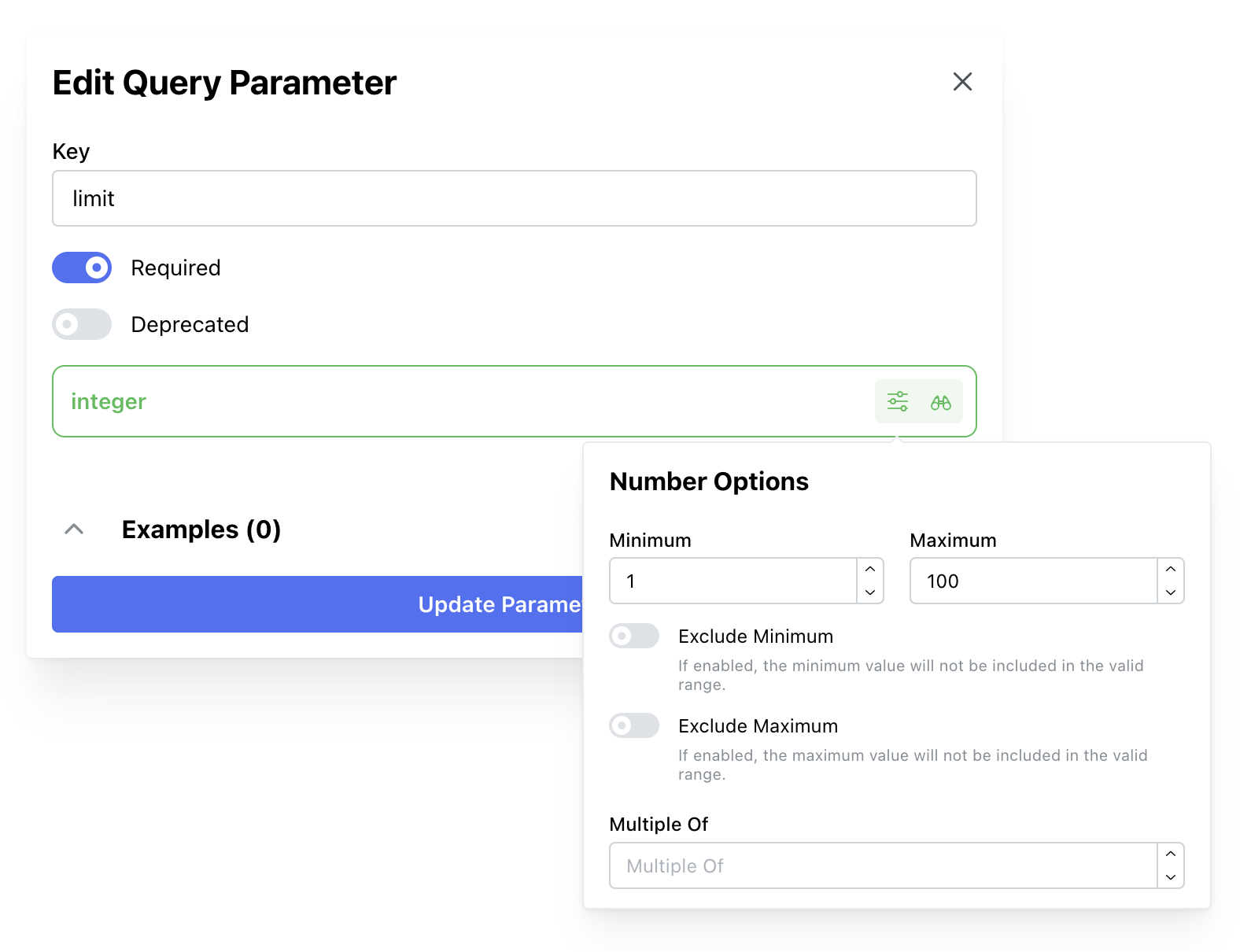
Regardless of which pagination strategy you use, it is important to document how API clients can utilize pagination in your API. Using Restly, you can clearly define the query parameters and response data available to your API clients so they know exactly how to interact with your API's endpoints.
For example, with Restly, you can define the following limit and offset parameters that clearly highlights to clients their acceptable ranges: